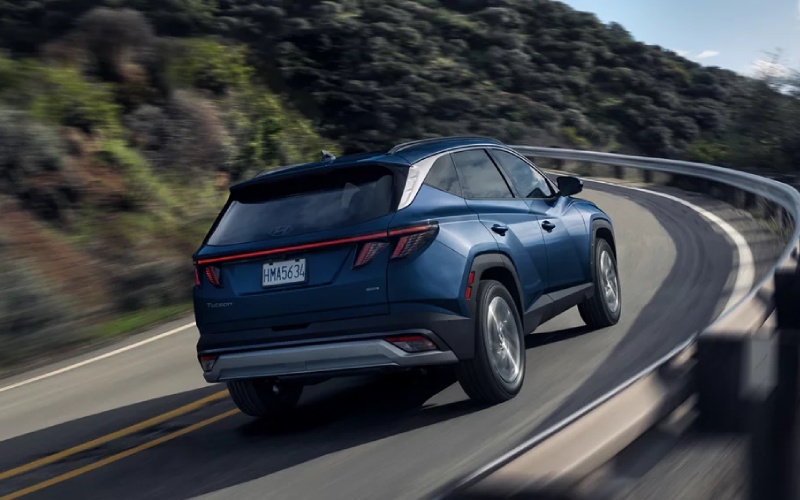
Tustin Hyundai - Why the 2026 Hyundai TUCSON’s Driver-Assist Tech Is a Smart Daily Upgrade around Garden Grove, CA
Daily life around Garden Grove, CA can be a tale of changing speeds—stop-and-go on the 22 in the morning, a quick hop across Brookhurst or Euclid for lunch, then a longer haul to see friends off Harbor Boulevard in the evening. The 2026 Hyundai TUCSON leans into those moments with driver-assist features that reduce friction and give you back some headspace. Instead of fighting traffic, you can focus on the day, confident that your SUV is working with you throughout the drive.
What stands out first is how well the systems cooperate. Hyundai SmartSense integrates features like Forward Collision-Avoidance Assist, Blind-Spot Collision-Avoidance Assist, Lane Keeping Assist, and Lane Following Assist so the TUCSON feels like an attentive copilot. On mornings when you roll onto the Garden Grove Freeway, available Highway Driving Assist can help with portions of steering, acceleration, and braking on compatible highways—subtly, without drama. Then, when you duck into a tight space near SteelCraft or the weekend market, the available Surround View Monitor gives you a clear 360-degree view to ease the final maneuver. It adds up to fewer tense moments and more controlled, predictable progress.
Confidence for Real-World Traffic
Hyundai’s tuning is key here. Lane Keeping Assist and Lane Following Assist do not constantly tug the wheel; instead, they nudge when you drift at low attention periods—say, when the afternoon sun makes the lane lines harder to see. Forward Collision-Avoidance Assist is designed to help if someone brakes hard ahead, while Blind-Spot Collision-Avoidance Assist can intervene if you begin to move into an occupied lane. These are the features you want engaging quickly in surprise moments and then vanishing seamlessly when you’re back in control.
For Garden Grove drivers who split time between city and freeway, Navigation-based Smart Cruise Control is a welcome option. It can adjust cruising speed in anticipation of curves, easing the brake-accelerate cycle that wears you down on long drives. At neighborhood speeds, Safe Exit Warning can help alert you to vehicles approaching from the rear, which is especially useful when you park along busy stretches near downtown.
Parking Help You’ll Actually Use
Good camera systems make a big difference when curbs, planters, and tight spaces are the norm. TUCSON’s available Surround View Monitor stitches together a top-down view that helps you place the vehicle precisely, even in narrow lots near cafes and local shops. The clarity and angle options boost confidence when you’re reversing past high SUVs or backing out to face oncoming traffic. Once you get comfortable with the system, you’ll catch yourself using it just to be faster and more precise—even when the space is not that tight.
The practical benefits extend inside the cabin too. When combined with the available dual 12.3-inch panoramic screens, the driver-assist and parking visuals are crisp and easy to interpret. Icons and prompts are large enough to glance at, yet the interface never feels cluttered. It is a small thing that pays off every single day: less time deciphering a menu means more time focused on the road.
Stretch-Out Comfort with Smart Tech
Driver assistance gets much of the spotlight, but what keeps the experience enjoyable in traffic is comfort and quiet. The 2026 TUCSON’s seats are supportive and the cabin is well-damped, so small jolts from patchwork pavement or rail crossings near neighborhood corridors do not echo through the interior. Available ventilated front seats cool you on hotter days, and the available Bose premium audio system offers a clean, balanced sound signature that pairs nicely with podcasts or playlists on wireless Apple CarPlay or Android Auto.
Hyundai Digital Key 2 adds even more daily convenience: use your compatible smartphone or smartwatch to lock, unlock, and start the vehicle. It is the kind of feature you appreciate when your hands are full after a grocery run or you’re juggling gym gear and coffee at the same time. You will also value the abundant second-row legroom, which makes carpool duty or shuttling family members more comfortable than many crossovers in this class.
Smarter Tech vs. the Usual Alternatives
Plenty of crossovers offer a good baseline of driver assistance, but the 2026 TUCSON stands apart with an available 360-degree camera system, refined Highway Driving Assist behavior, and upscale screen real estate when you choose the available dual 12.3-inch displays. Where some rivals still rely on smaller screens or basic camera views, TUCSON’s system improves situational awareness and reduces the little anxieties you feel when parking among larger SUVs and pickups. Add America’s Best Warranty coverage, and long-term confidence is another box you can check with ease.
If you’re considering TUCSON specifically for its tech, ask to demo the camera views and lane support systems on familiar Garden Grove routes. You will quickly sense the difference between assists that nag and those that actively support without calling attention to themselves. That natural feel is what many owners end up praising most—especially after testing multiple brands.
Frequently Asked Questions:
Which driver-assist features come standard on the 2026 Hyundai TUCSON?
TUCSON includes Hyundai SmartSense core features like Forward Collision-Avoidance Assist, Blind-Spot Collision-Avoidance Assist, Lane Keeping Assist, Lane Following Assist, Driver Attention Warning, and more. Select trims add options like Highway Driving Assist, Navigation-based Smart Cruise Control, and Surround View Monitor.
How does Highway Driving Assist help on local freeways like SR-22?
When equipped, it can assist with portions of steering, acceleration, and braking on compatible highways. It helps reduce workload in traffic waves, maintaining a comfortable buffer and keeping the SUV centered as flow changes.
Is the Surround View Monitor worth it for Garden Grove parking?
Yes. The 360-degree view makes parallel spots, crowded lots, and narrow driveways less stressful. It is especially helpful when larger vehicles limit your rearward visibility.
Can I use my phone as a key with the 2026 TUCSON?
When equipped with the Hyundai Digital Key 2, compatible smartphones and smartwatches can lock, unlock, and start the TUCSON. It is especially convenient when your hands are full or you want to leave the physical key at home.
Does the tech feel overwhelming?
No. The interface is clear, with large prompts and simple layouts. You can also tailor alert volumes and steering support levels, so the assistance feels personalized—not intrusive.
If you are ready to see how these features fit your routine, we can help you compare trims, demonstrate the systems on local routes, and find your ideal configuration. Tustin Hyundai is proudly serving Santa Ana, Laguna Woods, and Garden Grove with a process that makes upgrading to a 2026 TUCSON both straightforward and rewarding.