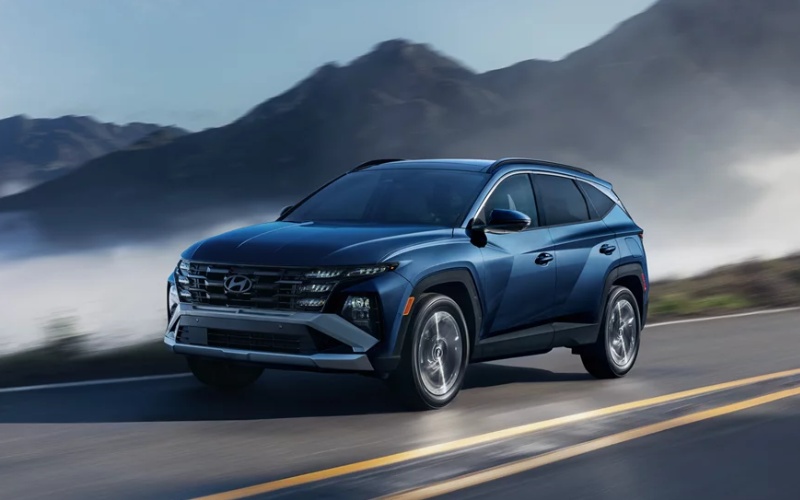
Tustin Hyundai - Which has the more helpful driver-assistance for Irvine, CA commutes — 2026 Hyundai TUCSON or 2026 Mazda CX-50?
What drivers really want from driver-assistance in daily traffic
Ask around any busy on-ramp or parking garage and you’ll hear the same thing: helpful driver-assistance is the tech you stop thinking about because it just works. When comparing the 2026 Hyundai TUCSON and 2026 Mazda CX-50 for Irvine, CA commutes, it’s not about the sheer number of features—it’s about how clearly those features present information and how smoothly they step in to help. Both SUVs offer broad coverage, yet the TUCSON’s interface, screen clarity, and thoughtful feature integration create a calmer experience when it matters most. The CX-50 is a capable partner too, especially with its i-Activsense® suite, but some of its most advanced assists are limited to upper trims, while the TUCSON spreads key assistance broadly and communicates with exceptional clarity.
Consider the first 15 minutes of a weekday morning. In the TUCSON, available Highway Driving Assist helps maintain lane centering and following distance on stretches of I-405 or SR-55, while Lane Keeping Assist keeps gentle tabs on you during brief lane-drift moments. The available Surround View Monitor offers high-resolution situational awareness while maneuvering out of a tight complex near an office park, and Blind-Spot View Monitor projects a live image into the cluster when signaling—valuable when a cyclist or scooter sneaks up the lane. In the CX-50, you’ll find comparable coverage with Lane-keep Assist, Smart Brake Support with pedestrian detection, and a 360° View Monitor on select models. Mazda’s Traffic Jam Assist shines in low-speed congestion, but Hyundai’s hallmark is how naturally the displays and prompts settle into your peripheral attention without demanding constant re-interpretation.
Parking, merging, and lane changes—where systems feel different
Parking lots and lane changes are where design choices show up. The TUCSON’s available dual 12.3-inch panoramic displays (cluster plus infotainment) present larger icons, cleaner arrows, and less visual clutter. It’s easier to check a camera view or set a driver-assist preference quickly, then get your eyes back to your environment. The CX-50’s 10.25-inch center display is crisp and responsive with touch functionality; its 360° View Monitor with See-Through View is a smart trick for seeing around the hood on select trims. Yet the Hyundai’s broader screen real estate and the way camera overlays are organized make quick maneuvers and three-point turns feel a bit simpler in the heat of the moment.
Another real-world difference is how the TUCSON blends steering feel with assist activity. Available Highway Driving Assist supports hands-on lane centering without the tug-of-war feel some systems can generate, so you emerge from longer stretches without the mental fatigue of fighting subtle corrections. Pair that with Blind-Spot View Monitor showing an in-cluster camera feed, and lane changes gain a welcome redundancy: you still shoulder check, but you also get a real-time view of the lane—particularly helpful around tall delivery vans and SUVs that block sightlines.
Assistance that supports—not replaces—the driver
Both Hyundai and Mazda emphasize that driver-assistance is supplemental. Where the TUCSON stands out is in its synthesis of alerts, camera cues, and steering support. Subtle audio tones and a consistent visual language reduce the cognitive load associated with parsing multiple systems. The CX-50’s i-Activsense® has evolved nicely, adding features like Traffic Jam Assist and Blind Spot Assist on higher trims; drivers who enjoy Mazda’s steering feedback will still find the help they want in congestion. But if your daily drive bounces among school lines, dense parking areas, and lanes that swell and shrink near interchanges, the TUCSON’s clarity becomes a noticeable advantage.
How connectivity and convenience amplify driver-assistance
Safety and convenience overlap more than you might think. In the TUCSON, the Hyundai Digital Key 2 Touch enables you to use a compatible smartphone for entry and start, which simplifies shared driving among family members and reduces key-fob juggling in tight garages. The available Hands-free Smart Liftgate with Auto Open lends a hand when you’re balancing backpacks or trade tools. And Bluelink+ keeps your connected features active without the annual expense anxiety of many competing plans. The CX-50 counters with Alexa Built-in and the MyMazda App, including Remote Engine Start and vehicle status—tools owners value day to day. Yet if you view assistance as a larger ecosystem—how easily you get in, get rolling, park, and lock up—the TUCSON’s convenience tools pair naturally with its driver-assist interface.
Who benefits most from each approach?
If you savor a sport-tuned steering feel and plan to stick with upper trims, the CX-50’s lane support, Traffic Jam Assist, and top-trim camera tech will suit you well. Drivers who want their vehicle to do more of the organizational heavy lifting—clearer screen layouts, in-cluster camera previews, smart entry, and an ownership plan that keeps connected features active—tend to gravitate toward the TUCSON. In other words: enthusiasts may lean Mazda; multitaskers often lean Hyundai.
Frequently Asked Questions:
Do both SUVs offer a 360-degree camera?
Yes. The TUCSON offers an available Surround View Monitor, while the CX-50 offers a 360° View Monitor, including a See-Through View on select trims.
Which model has a phone-as-key feature?
The TUCSON offers Hyundai Digital Key 2 Touch on select trims, enabling compatible smartphones to unlock and start the vehicle. The CX-50 does not currently offer a phone-as-key feature.
Is lane-centering support available on both?
Yes. The TUCSON offers available Highway Driving Assist for supportive lane centering and distance-keeping, while the CX-50 offers Traffic Jam Assist and lane-keeping features on select trims.
How do displays differ between the two?
The TUCSON offers available dual 12.3-inch panoramic displays for the cluster and infotainment. The CX-50 features a 10.25-inch center display with touch functionality and a 7-inch instrument panel display.
Whichever direction you’re leaning, it helps to test the systems back-to-back in the environments where you’ll actually drive. Try parking both in a tight structure, merge into flowing traffic, and flip through camera views while reversing and turning. Those simple moments tend to reveal whether the display logic and assist activity feel natural to you. If the TUCSON’s in-cluster camera previews and Highway Driving Assist gel with your habits, that’s a strong sign. If you prefer the CX-50’s steering feel and trim-specific tech mix, you’ll know that too.
When you’re ready to put each system to the test, Tustin Hyundai is here to help with tailored drive routes and side-by-side demonstrations—serving Irvine, Lake Forest, and Fountain Valley with a focus on making technology easy to understand and easier to use for daily life.