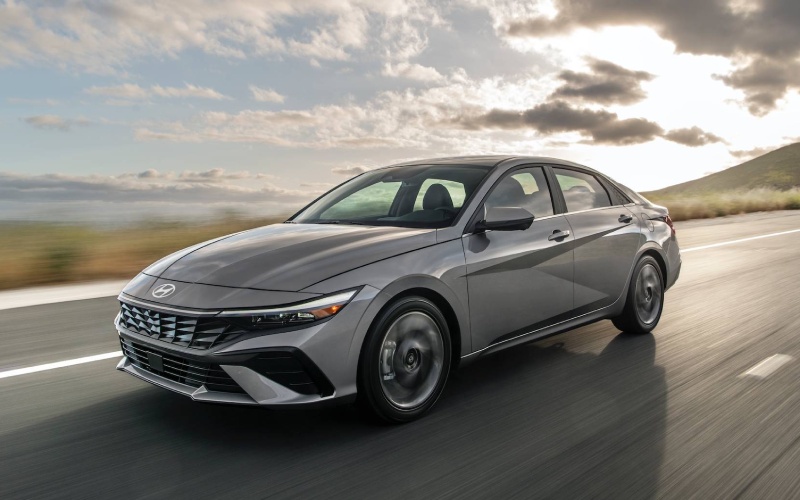
Tustin Hyundai - Can I use my phone as a key on the 2026 Hyundai Elantra near Irvine, CA?
If you live or work around Irvine, you probably juggle a phone, badge, gym fob, and apartment keys every day. The 2026 Hyundai ELANTRA takes one item off that key ring with available Hyundai Digital Key 2 Touch, letting your compatible smartphone unlock the doors and start the engine—no traditional key needed. At Tustin Hyundai, serving Lake Forest, Fountain Valley, and Anaheim, we help Irvine drivers set it up in minutes, then show how it streamlines daily life from University Town Center parking garages to quick grocery runs at Crossroads Center and evening meetups at the Irvine Spectrum.
What Hyundai Digital Key 2 Touch is—and why it matters in Irvine
Hyundai Digital Key 2 Touch turns a compatible smartphone into a secure vehicle key stored in your device’s native wallet app, such as Apple Wallet®, Google Wallet, or Samsung Pass. Walk up, touch the handle as prompted, hop in, press the start button—done. It is a simple quality-of-life upgrade that fits how Irvine residents move through busy schedules, where hands-free convenience and quick in-and-out stops are the norm.
It also travels well. Whether you are navigating daily I-405 traffic to the office, sharing the car with a UCI roommate, or heading to weekend hikes via the 133, using your phone as your key reduces the “Did I bring my keys?” moment to zero. And when plans change, you can share access digitally, which is especially helpful for multi-driver households in apartments and condos across Irvine, Tustin, and nearby Costa Mesa.
Trim availability and how it fits your ELANTRA build
Hyundai Digital Key 2 Touch is available on select 2026 ELANTRA models—most notably the ELANTRA Limited, which also brings high-end tech like Bose® Premium Audio, Hyundai Digital Key 2 Touch, and Highway Driving Assist (HDA). If you are considering SEL Sport or SEL Sport Premium, our team can walk you through which configurations include proximity entry and demonstrate the full phone-as-key experience on the lot. We will match you to in-stock vehicles so you can try it before deciding.
Of course, every 2026 ELANTRA is built to make tech easy. Wireless Android Auto™ and Apple CarPlay® are standard on the 8-inch touchscreen, and available dual 10.25-inch displays create a seamless, modern cockpit. That smart foundation is exactly why Digital Key 2 Touch feels so natural—everything works together to reduce friction in daily driving.
Digital Key vs. Bluelink+—what each does best
Shoppers often ask how Hyundai Digital Key 2 Touch differs from the MyHyundai with Bluelink app and Bluelink+. Here is a quick, real-world comparison for life around Irvine’s surface streets and garages:
- Core function: Digital Key 2 Touch is your phone-as-key for unlocking and starting the vehicle; Bluelink+ adds remote features through the MyHyundai with Bluelink app, such as remote lock and unlock.
- Who it helps: Digital Key 2 Touch is ideal for everyday drivers and shared vehicles; Bluelink+ is great when you need remote access from virtually anywhere you have app connectivity.
- Sharing access: Digital Key 2 Touch lets you text a key to another compatible smartphone; Bluelink+ adds remote controls that are handy if a family member needs help from afar.
- Around Irvine: Digital Key 2 Touch is perfect for quick garage entries at Irvine Spectrum and UTC; Bluelink+ helps if you want to lock the car you parked on Culver or Jamboree after you have already walked away.
Both tools can live on your phone—and together they cover virtually every access scenario, from hands-on to remote. Better still, original owners and lessees get Bluelink+ benefits included with no monthly fees on new Bluelink-equipped Hyundai models, so you can enjoy the app’s convenience alongside your phone-as-key experience.
How to set up Hyundai Digital Key 2 Touch
We set up Digital Key 2 Touch with customers on delivery day, but if you like to tinker, the process is straightforward. Here is a simple overview so you know what to expect when you visit Tustin Hyundai:
- Confirm compatibility: Bring your compatible smartphone—our product specialist will verify support for Apple Wallet®, Google Wallet, or Samsung Pass.
- Add the key: We will guide you through adding your ELANTRA’s key to your phone’s wallet, following the prompts on your infotainment screen.
- Test unlock and start: Step outside, lock the car, and then use your smartphone to unlock and start the ELANTRA to confirm everything is paired.
- Set up sharing: If you plan to share the vehicle, we will demonstrate how to send a Digital Key to a roommate or family member and how to revoke access anytime.
- Learn best practices: We will review tips for everyday use—where to hold the phone for a consistent “touch,” and how features work with proximity entry and push button start.
Prefer a hands-on walkthrough? We are happy to complete the entire setup for you at 16 Auto Center Dr in Tustin—just a quick drive from Irvine—so you leave with everything ready to use.
Security, sharing, and daily confidence
Security matters when your phone is your key. Hyundai Digital Key 2 Touch is designed to work with your smartphone’s wallet security and the vehicle’s onboard systems. You control who has access and for how long, and you can stop sharing anytime. For households in Irvine with changing schedules, that flexibility beats handing a physical key back and forth—and it is especially useful if one driver spends more time on the 5 and the other stays local on Culver, Harvard, and Jeffrey.
For peace of mind, we recommend keeping your physical key in a safe place as a backup. We will cover practical tips during your test drive and first setup, so you feel confident day one.
How Digital Key 2 Touch fits with the rest of ELANTRA’s tech
The phone-as-key experience is part of a bigger picture that makes the 2026 ELANTRA a smart Irvine commuter. Available Smart Cruise Control (SCC) with Stop & Go helps take the edge off I-405 congestion, and Highway Driving Assist (HDA) on ELANTRA Limited helps maintain a set distance and speed and helps center the vehicle in its lane on eligible highways. Standard Hyundai SmartSense features, including Forward Collision-Avoidance Assist with Pedestrian Detection (FCA-Ped), Lane Keeping Assist (LKA), Lane Following Assist (LFA), Blind-Spot Collision Warning (BCW), Rear Cross-Traffic Collision-Avoidance Assist (RCCA), Driver Attention Warning (DAW), High Beam Assist (HBA), Safe Exit Warning (SEW), and Rear Occupant Alert (ROA), add confidence across daily errands and weekend trips.
Inside, the tech-forward cabin feels intuitive the moment you sit down. Wireless Android Auto™ and Apple CarPlay® pair quickly on the standard 8-inch display, while available dual 10.25-inch screens elevate navigation and driving info. Add the available wireless device charging pad, and you have a clean, cable-light setup that makes door-to-door life in Orange County easier than ever.
Beyond daily tech, the ELANTRA’s fundamentals shine for local living: compact exterior dimensions that slip easily into apartment and campus parking, a spacious 99.4 cu. ft. passenger volume for friends and colleagues, and a trunk with 14.2 cu. ft. of cargo space for farmers market hauls at Great Park or bulk buys at The Marketplace. With America’s Best Warranty and our factory-trained service team right here in Tustin, ownership is as reassuring as it is convenient.
Frequently Asked Questions:
Which 2026 Hyundai ELANTRA trims include Hyundai Digital Key 2 Touch?
Hyundai Digital Key 2 Touch is available on select ELANTRA models and is featured on ELANTRA Limited. If you are considering another trim, visit us and we will verify availability and demonstrate the feature on in-stock vehicles so you can experience it yourself.
Can I share my Digital Key with a roommate or family member in Irvine?
Yes. Digital Key 2 Touch lets you share access from your compatible smartphone to another compatible smartphone. You control who has access and for how long, and you can stop sharing anytime—great for multi-driver apartments and townhomes around Irvine.
How is Digital Key 2 Touch different from the MyHyundai with Bluelink app and Bluelink+?
Digital Key 2 Touch turns your phone into the key you use at the door and the start button. The MyHyundai with Bluelink app pairs with Bluelink+ to add remote features like lock and unlock through the app. Many drivers use both—phone-as-key for daily entries and app controls for times when they are away from the vehicle.
Will Digital Key 2 Touch work in parking garages like at Irvine Spectrum?
Digital Key 2 Touch is designed to work as a touch-to-unlock and start experience using your compatible smartphone and the vehicle’s systems. For remote commands in the MyHyundai with Bluelink app, connectivity is required. If you frequent certain garages, we are happy to test functionality with you during a demo drive.
What if my phone battery is low?
We recommend carrying your physical key as a backup and keeping your phone adequately charged, especially on longer days around Orange County. During delivery, we will go over practical usage tips for your specific device.
Can Tustin Hyundai set up Digital Key for me?
Absolutely. We will confirm device compatibility, add your key to your phone’s wallet app, demonstrate door unlocking and engine start, and show you how to share and revoke access. You will leave confident and ready to use it on day one.
Ready to try Hyundai Digital Key 2 Touch on the 2026 ELANTRA? Visit us at Tustin Hyundai—just minutes from Irvine—for a hands-on demo. We will pair your smartphone, walk you through Bluelink+ benefits, and help you choose the right ELANTRA configuration for your daily drive across the 405, 5, and 55.